

The fastest way to order extras for team apparel is to reuse your existing team shop link or place a direct reorder with your vendor, lock sizes and artwork against a firm cutoff date, and request a proof before anything prints. Order a couple of backup sizes if you’re short on time. RNK Apparel supports reorders and roster-based personalization, so late additions don’t mean starting the whole process over.
TL;DR:
- Confirm roster sizes, item types, and final deadlines before requesting a quote to avoid delays and sizing errors that require reordering.
- Use reorders or direct vendor requests for quick extras instead of setting up a new team shop when adding a few last-minute items before a game.
- Send vector files, exact color specifications, and clearly formatted rosters with proof sign-offs to prevent reprint requests and delays.
- Expect typical production times of about one to two weeks for standard orders, with rush options available at additional costs and faster turnaround.
- Establish a fixed proof sign-off window and keep final roster and proof documents accessible to avoid disputes and ensure quick exchanges.
Table of Contents
- Quick Checklist: What To Do First When You Need Extras
- Team Shop, Group Order Link, or Direct Reorder: Which Fits Your Situation?
- Getting Sizes Right and Handling Exchanges Without Losing Time
- Files, Roster Formatting, and Name/Number Rules That Prevent Reprints
- What Drives the Price When You Add Extras to an Order
- How Long Extras Actually Take To Produce and Ship
- Collecting Sizes and Payments Without Fifty Text Messages
- How Returns and Exchanges Work on Team Orders
- What You’ll Actually Pay: Taxes, Shipping, and Hidden Fees
- Timeline Overview: From Placing the Extras Order to Delivery
- How RNK Apparel Helps With Extras and Reorders
- Author Perspective: Lessons From Servicing Team Orders
- Sources
Quick Checklist: What To Do First When You Need Extras
Before you touch a form or send a group text, nail down these six things in order. Skipping step two is how coaches end up with three extra-large jerseys and no smalls.
- Decide item types and quantity. Tees, hoodies, or accessories? Pin down how many before you contact anyone.
- Confirm roster and sizes. Cross-check who actually needs the extra against who already has gear.
- Set a final deadline. Give yourself a real cutoff, not a “soon.”
- Prepare artwork and roster list. Names and numbers need to be spelled and formatted exactly right.
- Pick your ordering path. Team shop, group order link, or a direct reorder with your existing vendor.
- Decide shipping method. One box to you, or separate shipments to each player’s home.
Get those six answers locked before you request a quote, and the rest of the process moves in days, not weeks.
Team Shop, Group Order Link, or Direct Reorder: Which Fits Your Situation?
Each ordering path solves a different problem. Pick based on how much admin time you have and how much control you need over the final product.
- Team shop: Best when you expect ongoing orders all season and want low admin after the initial setup. Players and parents check out individually, which also makes it a solid fundraising tool since team stores enable direct checkout and shipping without you handling every payment.
- Group order link: You lock the product choices (say, one hoodie style in team colors), and teammates each pick their own size and personalization through a shared link. This is the option most coaches underuse, and group-order workflows exist specifically to cut down the coordinator’s manual entry.
- Direct reorder: The right call when you need a handful of extras fast, matching a kit you’ve already ordered. No new setup, no new proof cycle if the design hasn’t changed.
If you’re adding five jerseys before Friday’s game, skip the team shop setup entirely and go straight to a direct reorder from the trainers options at YDA UK.
Getting Sizes Right and Handling Exchanges Without Losing Time
Sizing mistakes are the number one reason extras orders turn into a second round of extras orders. Build in a buffer before you need one.
- Collect sizes using your standard distribution (more mediums and larges than extra-smalls, typically) plus one or two buffer sizes in whatever runs out first each season.
- Run a short try-on window with current gear and write down actual fits, not guesses from memory.
- Ask your vendor directly how exchanges work: store credit, free exchanges, or something in between, and how long the window stays open. Vendor return policies for team orders vary widely by region and provider, so get this in writing before you order rather than after a parent complains.
Pro Tip: Keep one or two backup items in a common adult medium or large on hand. When a late roster addition shows up the week before a tournament, you’ll have something to hand them instead of scrambling for a rush order.
Files, Roster Formatting, and Name/Number Rules That Prevent Reprints
Vendors can only print what you give them cleanly. Sloppy files or roster lists are the top cause of reprint requests.
- Send vector files (AI, EPS, or SVG) for logos, not a low-resolution PNG pulled off a website. Vectors scale to any size without going blurry, and most print shops require them for clean edges.
- Include exact color specs, Pantone, RGB, or HEX, so the printed color matches what’s on your website or jerseys already.
- Format your roster list with exact spellings and check for number conflicts before submitting; two players can’t both be “23” on the same order.
- Different decoration methods (sublimation, screen print, embroidery) carry their own cost and turnaround trade-offs, so confirm your chosen method works with your artwork before finalizing.
- Always request a digital proof and set a short sign-off window, 24 to 48 hours is standard, so the order doesn’t stall waiting on your reply. Getting a logo properly set up for apparel at the start avoids most of these headaches later.
What Drives the Price When You Add Extras to an Order
Your invoice breaks down into four pieces: garment cost, decoration cost, any setup fee, and quantity tier. Extras don’t automatically cost more per item, but they can trigger a new setup charge if your original order already closed out.
- Garment, decoration, and setup fees each move independently. Adding five more of the exact same shirt often keeps the same per-item rate as the original order.
- A brand-new item type (say, adding hoodies to a tee-only order) usually means a fresh setup charge even if the logo is identical.
- To save money, add extras to an order that’s still open, bundle multiple item types into one production run, or scale back decoration complexity (fewer colors, simpler placement).
- Always ask for an itemized quote covering your final quantity before approving anything. Small reorders are genuinely workable with no-minimum vendors, though the per-unit cost typically runs higher than a full bulk order.
How Long Extras Actually Take To Produce and Ship
Production time depends almost entirely on decoration method. Screen printing tends to move faster than embroidery on a large order, and heat-transfer names and numbers add a step that sublimation handles differently.
- Confirm your production window upfront, and don’t assume “fast” means the same thing at every vendor.
- Rush fees usually kick in when you need a shorter window than the standard quote, sometimes worth paying, sometimes not, depending on how close you are to game day.
- Decide between one consolidated shipment to you (easier for team pickup) or individual shipping straight to each player’s address (less coordination on your end, more shipping cost overall).
- Get a guaranteed delivery date in writing before production starts, not just an estimate.
Some vendors advertise print-and-ship windows as tight as one to two days on certain items, though that pace typically applies to simpler decoration and smaller quantities rather than a full team kit with names and numbers.
Collecting Sizes and Payments Without Fifty Text Messages
Chasing sizes and money through group texts is how deadlines slip. A single shared system beats a dozen separate conversations.
- Set up one shared form or spreadsheet covering sizes, item selections, and payment status in one place everyone can see.
- Decide your payment model. Either collect payment upfront as a team, or route individual payments through a team shop so the vendor handles the transactions.
- Build a communication schedule: announce the order, send one reminder, state the deadline clearly, run the try-on window, and confirm the pickup date.
- Run final checks before launch: proof sign-off from you, a locked final size list, and a confirmed shipping address for every player if shipping individually.
Pro Tip: Send the deadline reminder 48 hours out, not the morning it’s due. That extra buffer catches the parent who forgot and saves you from reopening the form for one late size.
How Returns and Exchanges Work on Team Orders
Return and exchange policies for team apparel differ from what you’d expect buying a single item online, and they vary by vendor and by region. Most vendors treat a team order as a batch, which changes how swaps get processed.
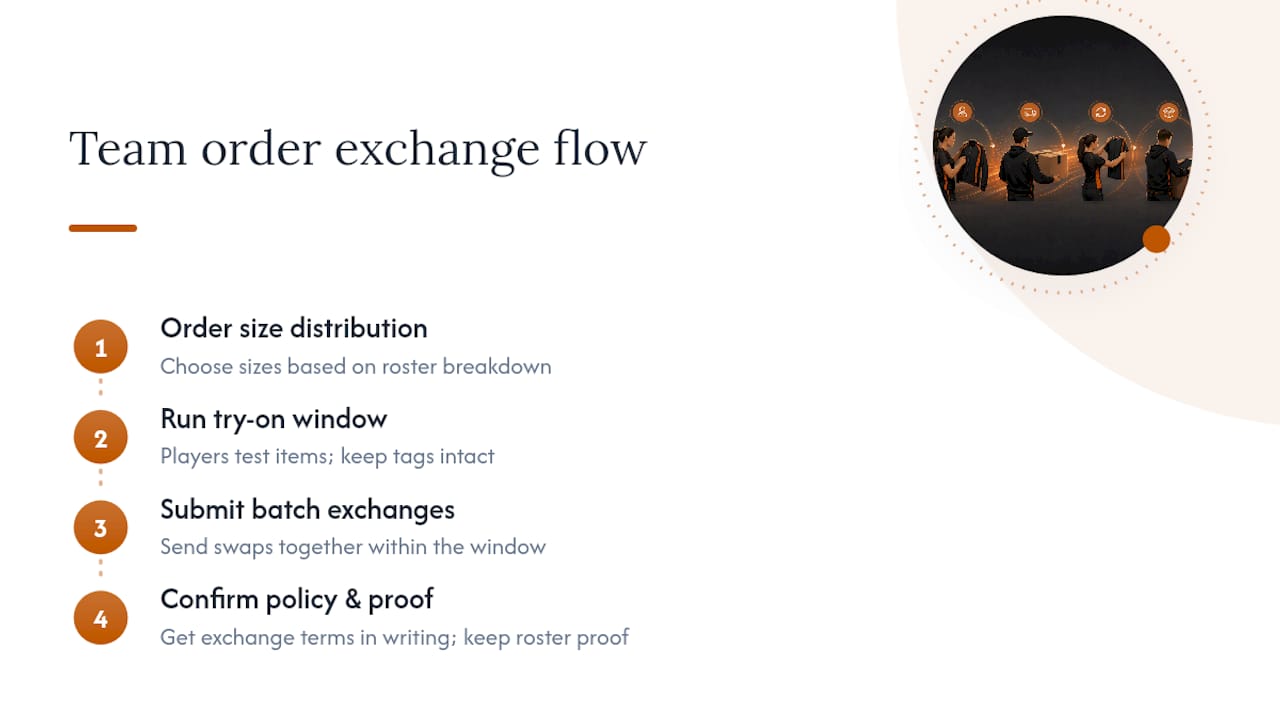
The common approach: order a suggested size distribution based on your roster’s typical breakdown, run your try-on window, then submit exchange requests as a single batch rather than one-off returns. Vendors that handle team orders regularly recommend this size-distribution-plus-swap approach specifically because it’s faster than processing returns individually as they trickle in.
Whether exchanges cost anything depends on the vendor. Some offer free size swaps within a set window, typically two to four weeks, provided the item is unworn and tags are intact. Others issue store credit instead of a refund, especially on personalized items with a name or number already printed, since those can’t be resold to another customer. That’s worth confirming before you order: personalized gear almost always falls under stricter exchange rules than blank stock items.
Ask three specific questions before you place the order: what’s the exchange window, is it free or store credit, and does personalization void the exchange entirely? Get the answer in writing, ideally in the order confirmation email, so there’s no dispute later if a player’s number 14 hoodie shows up a size too small. Keep your original roster list and proof on file. If a dispute comes up about sizing or a printed name, having the signed-off proof settles it in seconds instead of a back-and-forth email chain.
What You’ll Actually Pay: Taxes, Shipping, and Hidden Fees
The quoted price per shirt is rarely the full story. Four categories typically show up on a team apparel invoice, and missing one is how a budget goes sideways mid-season.
Sales tax applies based on your shipping address and follows your state’s standard rate for apparel, the same as any other online purchase. There’s no special team-order exemption in most states, so budget for it rather than assuming a nonprofit or school affiliation waives it automatically; that depends entirely on your organization’s tax-exempt status, not the vendor.
Shipping costs shift depending on whether you choose one consolidated shipment or individual shipping to each player. Consolidated shipping to one address is almost always cheaper per item, while ship-to-player convenience costs more but saves you a pickup event.
Setup fees apply when a design is used for the first time or when adding a new item type mid-season. If your logo is already on file from a prior order, ask specifically whether the setup fee gets waived for the reorder, since policies differ by vendor.
Rush fees, if you need a shorter turnaround than standard, get added on top of the base quote and vary by how compressed the timeline is.
Before you approve anything, request one itemized quote showing garment cost, decoration, setup, tax, and shipping as separate line items for your exact final quantity. That single document is what keeps a $12 shirt from becoming a $19 surprise once everything’s added up.
Timeline Overview: From Placing the Extras Order to Delivery
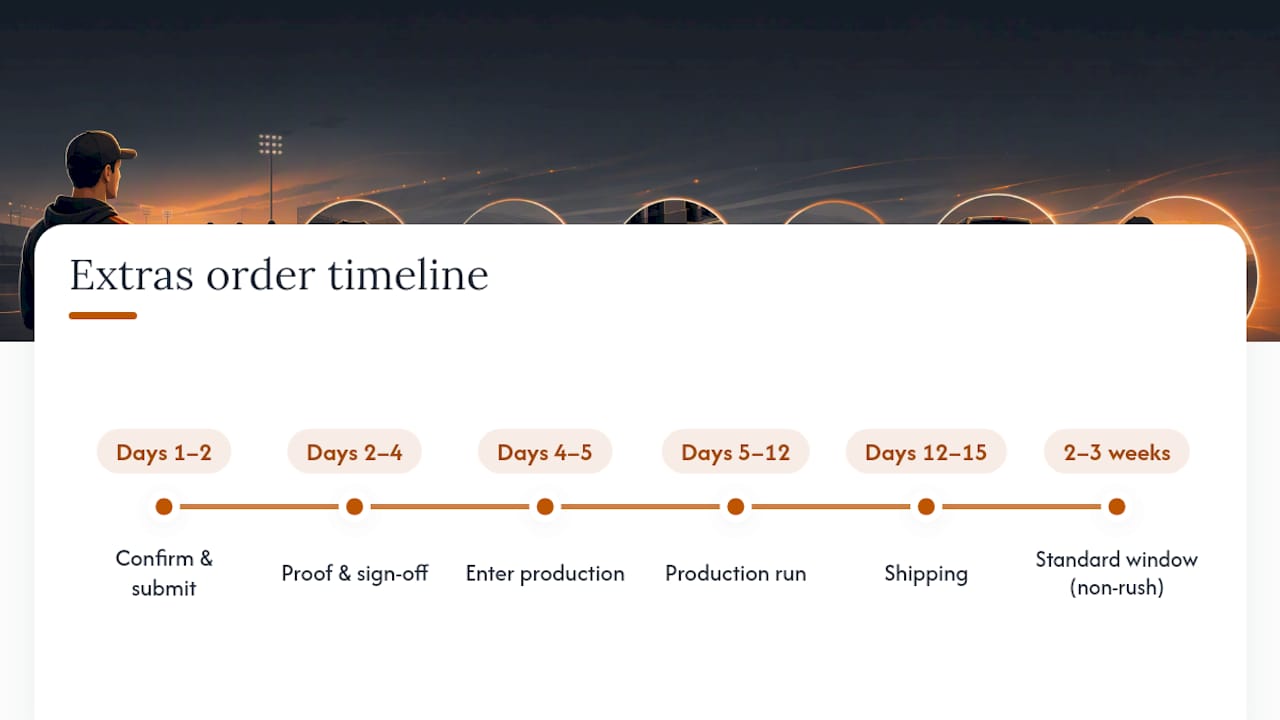
Here’s roughly what the calendar looks like once you decide you need extras, assuming a standard (non-rush) order:
Days 1 to 2: Confirm quantities, sizes, and artwork internally. Submit the order or reorder request to your vendor.
Days 2 to 4: Vendor prepares and sends a digital proof for your sign-off. This is the step most likely to stall if you don’t respond within your 24 to 48 hour window.
Days 4 to 5: Proof approved, order enters production.
Days 5 to 12: Production runs, depending on decoration method and item count. Screen printing on a small batch moves faster than embroidery on a large one.
Days 12 to 15: Shipping, whether consolidated to you or split across individual addresses, typically adds another few days on top of production.
A realistic full window, from the moment you decide you need extras to the box landing at your door, runs about two to three weeks for standard turnaround. Rush options can compress that, usually at added cost, but the proof sign-off step is the one variable entirely in your control. Answer fast, and you protect every other deadline downstream.
How RNK Apparel Helps With Extras and Reorders
RNK Apparel Co. covers exactly the gear coaches reorder most: custom hockey tees, hoodies, long sleeve tees, and accessories like hats and bags, all with roster-based personalization for names and numbers.
Reorders don’t require rebuilding your order from scratch. RNK keeps your team’s logo and past specs on file, so a late addition to the roster or a lost jersey means requesting a quick proof and confirming sizes, not starting over. Need to swap a size after a player’s tryout? RNK’s team accounts make that a straightforward request rather than a return-and-repurchase cycle. Coaches running ongoing seasonal orders can also set up a dedicated team shop through RNK, giving parents and players a direct checkout link instead of routing every payment through you.
If you’re ready to move, gather your roster, confirm your logo file, and check RNK’s hockey team tee collection to request a quote or proof for your next extras run.
Author Perspective: Lessons From Servicing Team Orders
Most delays on extras orders trace back to two things: a roster change that arrives after production starts, and a proof sign-off that sits unanswered in someone’s inbox for a week. Neither is a vendor problem. Both are timing problems a coach can fix.
The shortcut that actually works: schedule a firm 24 to 48 hour proof window and lock sizes the moment that window closes, no exceptions for the one parent who’s still deciding. Keep the final roster and the signed-off proof somewhere you can find them in thirty seconds, because that record is what settles any exchange dispute months later without an argument.
— Eric
